
Overview/ Rationale
The year 2020 will be remembered as the year of the novel coronavirus (COVID-19). Around the world, hundreds of thousands of people died from the disease, schools and businesses shut their doors, wearing masks in public places became commonplace, and unemployment soared. Everyone and everything changed in ways large and small, and libraries were no exception. The pandemic has greatly impacted higher education, including academic libraries like The Cebu Normal University – Learning Resource Center.
Since the start of the quarantine in March 2020 due to the COVID-19 pandemic, the Cebu Normal University, following the policies set by the government, has suspended its public on-site operations. Despite the situation, the Learning Resource Center has never stopped its services and continued to support the informational needs of the academic community virtually. Keeping its patrons’ learning needs is the top priority of the LRC. Thus, starting May 2020, online reference assistance thru the Document Delivery Service was launched. The online information assistant/ web chat service “ASK MINNIE” was also launched by November 2020 for online reference questions or short queries. The LRC’s official website and Facebook page was made accessible on a 24/7 basis for Normalites.
The LRC is presently engaged in full-time preparation for its services in the new normal complementing the remote delivery of instruction with these guidelines below to different services identified by the LRC professional librarians’ team. These guidelines will also serve as guiding protocols for the smooth delivery of the new normal services.
A. Online Book Recommendation (Assistance/ Mechanism for the Procurement of the Book). This service is intended to give library customers access to resources that are specifically suited to their needs. To facilitate receipt of recommendations from our library clients through non-physical contact transactions in the effort to develop library collections, CNU faculty may recommend book/s for purchase via the library’s e-mail or through the “Online Book Reservation Form”
Procedures (via email):
- Send email to library@cnu.edu.ph
- Indicate “Online Book Recommendation” as the subject of your email.
- Provide in the email the bibliographic information (Title, author, edition (if any); publisher, copyright year, subject etc.) of your recommended book/s for purchase.
- Technical Services Librarian will inform the faculty through email the status of the request.
- Procurement of books will go through the standard Procedure of Procurement.
- Books delivered will be quarantined for 72 hours.
- Circulation librarian will inform the faculty once materials are ready for circulation.

Procedures (library website):
- Faculty will fill-out the Online Book Recommendation Form which can be accessed at the website: https://library.cnu.edu.ph/online-book-recommendation/ / https://bit.ly/3jTvmci
- Technical Services Librarian will inform the faculty through email the status of the request.
- Procurement of books will go through the standard Procedure of Procurement.
- Books delivered will be quarantined for 72 hours.
- Circulation librarian will inform the faculty once materials are ready for circulation.
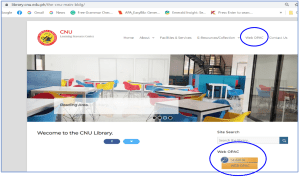
B. Online Public Access Catalog (OPAC). The Online Public Access Catalog is an online database of materials and resources available in the library. Search this database to check if the library has the resources you need. You may access it online at https://library.cnu.edu.ph and click Web OPAC.
Procedures:
- To access the OPAC go to https://library.cnu.edu.ph and click the Web OPAC tab.
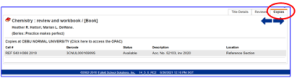
- You will be directed to this page and click the text “CEBU NORMAL UNIVERSITY (Click here to access the OPAC)”

- Do a basic search by clicking the Basic tab and entering your search term in the search box. Do a keyword search to pull as many resources there are. Or specify your search by doing an author, title, or subject search.

- Alternatively, you may click the Power tab to do an advanced search using Boolean operators and search limiters. This allows you to take more control of your search.

- When the search results page is displayed, click the Details tab to view the bibliographic information of the resource. The bibliographic information displays the author, title, publication year (copyright), subject, series, and other important details of the resource.

- Finally, go to the Copies tab to view the call number, status and location of the resource. If the resource is unavailable, the due date is posted so you will know when to come back to the library to borrow it.
below is a short video instruction on how to use the web OPAC
C. Document Delivery Service (DDS) – DDS is a new service of CNU-LRC which was launched last May 1, 2020 during the Covid-19 outbreak. The document delivery service handles articles and book chapter requests from journals, e-resources, printed books and other resources available at the CNU Learning Resource Center, as well as open access databases. Please keep in mind that request should not be for the entire book or journal but for parts/articles. Patron/requestee may include the title of the article/chapter/journal where it appeared, the place and date of publication, page numbers to be requested, and other pertinent details at the Specific Request field. These documents requested through the Document Delivery Service will be sent electronically via email. DDS is only exclusive to bona fide Normalites which includes the CNU faculty, students, and non-teaching staff.
- All bona fide members of Cebu Normal University may request DDS.
- Fill-up the form for Document Delivery Service available at the CNU Library website https://library.cnu.edu.ph/document-delivery-services/

- Normal processing time takes 2 to 3 working days but subject to the volumes received.
- The information requested will be reviewed by an Electronic Services Librarian and assigned to the ER-DDS Taskforce.
- The assigned librarian will facilitate and provide assistance on the topic/query requested.
- Once the material/resource is ready, the assigned librarian will send an email to the client/requestee.
- The client will acknowledge receipt of the resources and instructed to fill-in the evaluation form: https://forms.gle/n5yTSHGyXP5jCAdn7.
- E-resources librarian will mark the name of the librarian who responded/handled the query in the document delivery responses Excel sheet.
D. Ask a Librarian – is a Facebook-based library chat service (formerly Ask Minnie). It is the virtual assistant or persona that library customers interact with, and an assigned librarian will respond to the queries posted. The chat service started last July 2018 and was officially launched last November 10, 2020 and has been utilized by CNU faculty, alumni, students, and outside researchers since then. Facebook was used as the platform for this service as most of our users have a Facebook account and it is more convenient for them to send a message through Facebook messenger.
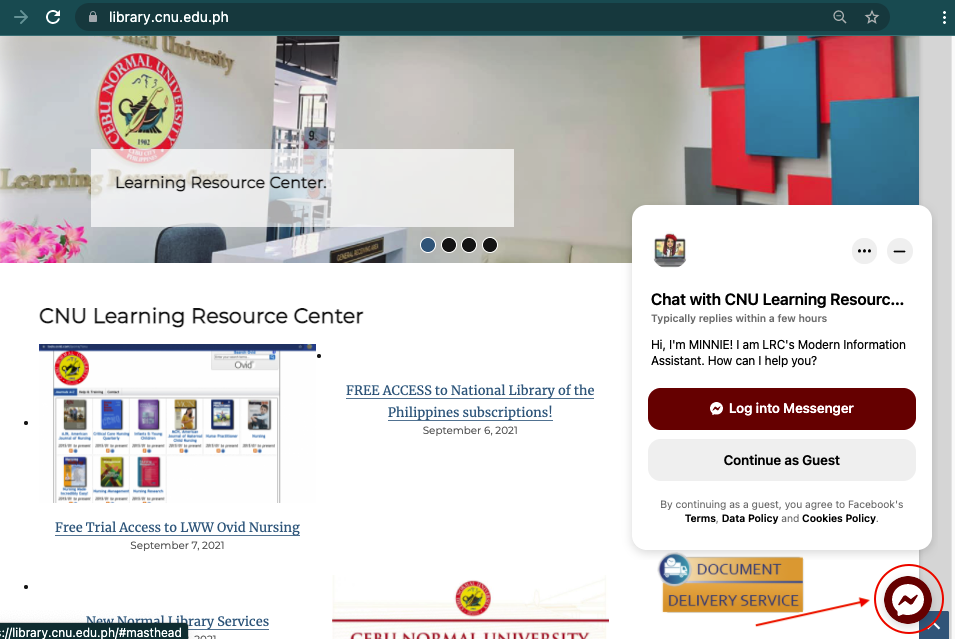
Procedures:
- Clients can access the chat / Ask a Librarian via the library website https://library.cnu.edu.ph/ or the CNU Learning Resource Center Facebook page http://m.me/CNULib/. https://www.facebook.com/CNULib
- Check out / click the chat icon on the lower right side of the library website and also at our CNU Learning Resources Center Facebook page.
- There is a list of commonly asked questions that clients can simply click on and they will be automatically answered. They are as follows:
- How to make a request for references/electronic resources,
- How to return the books borrowed?
- Is the library open for students and outside researchers? and
- Do you have an Online Public Access Catalog?
- If the query is not found on the set of questions, clients can ask or chat about anything related to library services only.
- Ask a Librarian is available to chat from Monday-Friday 8:00 AM to 12:00 PM, and 1:00 PM to 5:00 PM except for Saturday, Sundays and Holidays. Questions and requests sent on Saturdays, Sundays or holidays will be handled/addressed the next working day.
E. Scanning Services. For online request of scanned copy of article or chapter of a book, only 10% or less of the total volume of the printed material is allowed (or equivalent to 1 chapter of a portion of a book). For Theses and Dissertations, only the title page, table of contents and abstract are allowed to be scanned. Only the bona fide students, faculty and staff of Cebu Normal University can avail of this service.
(Disclaimer: The material is protected by the copyright law and should not be printed, reproduced, or sold without permission from the author)
Click here to fill-up – Document Delivery Service form
F. Access to Available Subscribed Print Periodical Articles. The library keeps an electronic copy of the title cover and table of contents of its print periodical subscriptions for online viewing and access. To notify the CNU community about its recently received subscription, the journal covers and table of contents were scanned, converted to pdf, and published on the official library website. The service officially started February 26, 2019. The electronic format can be accessed through the Periodical Subscriptions page/category under the menu for E-Resources/ Collection or via this
link :https://library.cnu.edu.ph/category/periodicals-section-announcement/periodical-subscriptions/
Procedures:
- The periodical librarian scans the cover page, table of contents, and some of the featured articles from newly delivered journals/magazines and converts them to PDF.
- The periodicals librarian then uploads the PDFs to the official library’s Google Drive
- The Web services librarian embed the scanned table of contents at the library website
- Announcements will be posted at the library website home page and CNU Learning Resource Facebook page to notify / inform CNU community that new titles of magazines and journals are now available. Table of contents can be accessed/downloaded.
- CNU students and faculty can view and download the table of contents by visiting the link provided example : https://library.cnu.edu.ph/print-periodical-subscriptions-delivered-as-of-october-december-2020/
- Click the image to view the table of contents.
- Only bona fide students and faculty and staff of CNU can request for a full text article, not the entire journal/magazine.
- Click the document delivery service form https://library.cnu.edu.ph/document-delivery-services/ to request for the full-text article of magazines and journals.
G. Access to Newspaper Clippings. The CNU LRC provides access to a valuable collection of newspaper clippings files. The periodicals section selects and maintains files containing articles from the various Philippine national, regional, and local publications that Cebu Normal University subscribes to. Their research value is that they are relevant to the University’s programs/courses and cover current issues. The service was officially launched last January 7, 2021. The newspaper clippings that have been uploaded are from 2019 to the present. The scanning of previous issues of newspaper clippings is currently ongoing.
Here a link to the newspaper clippings: https://library.cnu.edu.ph/newspaper-clippings/ or click the E-resources/Collection menu and select the Newspaper clippings page.
Procedures:
- The periodicals librarian selects relevant newspaper articles from the CNU LRC’s newspaper subscription (Sunstar, Philippine Star, The Freeman, Philippine Daily
- Inquirer etc.).
- The periodicals librarian then scans the relevant article and uploads the image/pdf to a subject-specific folder on the library’s Google Drive.
- Web Services librarian embeds newspaper clippings by subject. Clients can access the compiled newspaper clippings saved on the library’s Google drive by clicking the subject.
Link: https://library.cnu.edu.ph/newspaper-clippings/
- All bona fide students, faculty, and staff can access the entire set of digitized newspaper articles by using their official email address (for example, ellosa@cnu.edu.ph or main.19000245@cnu.edu.ph).
 Open Access Learning PH